Configuration Tab
Configuration Tab
The Config tab sets receiver startup defaults, filter passbands, display behavior, calibration, hardware interfaces, and ADC clock behavior.
Startup Defaults
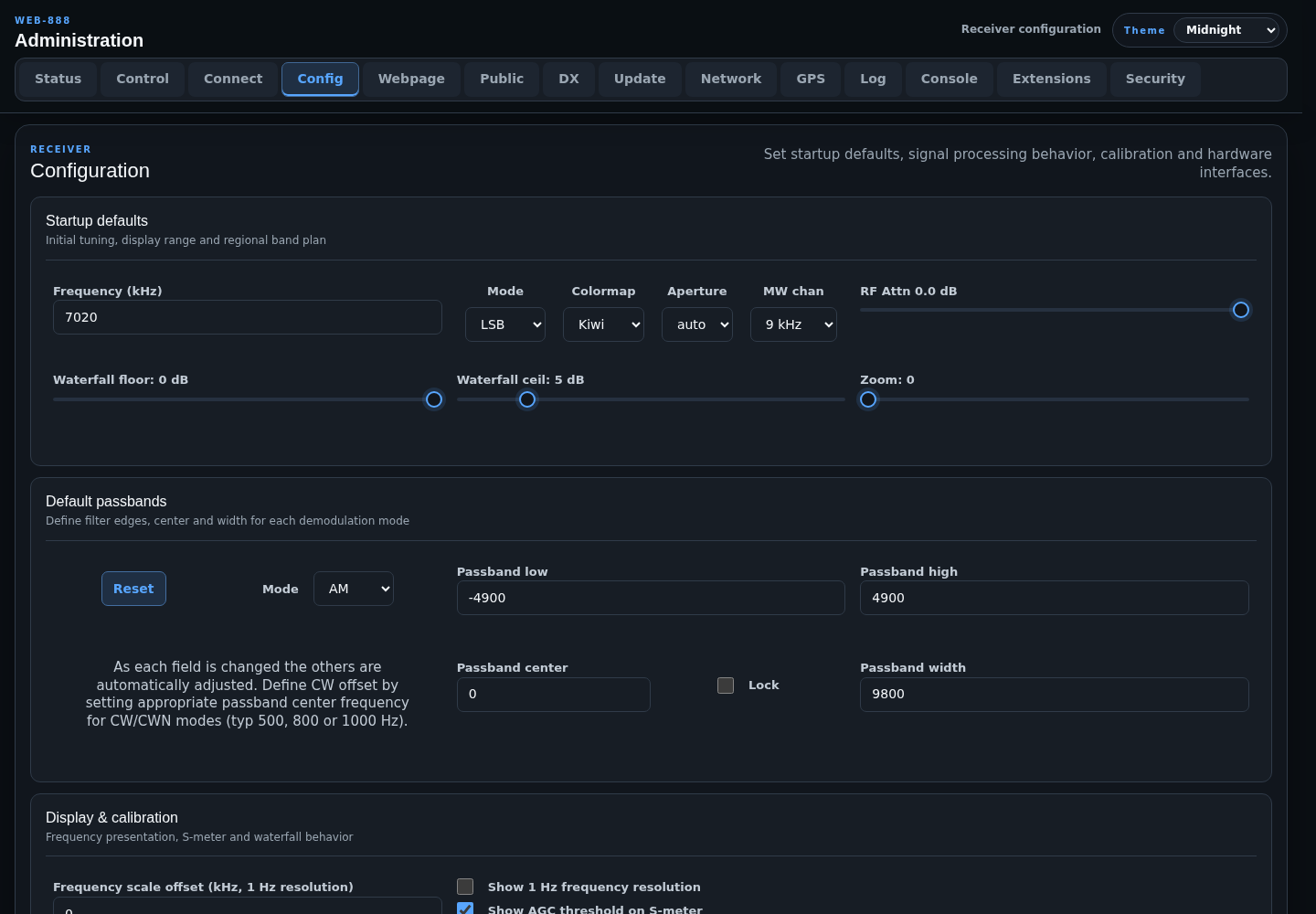
- Frequency (kHz), Mode, and Colormap set the initial receiver tuning and display.
- Aperture selects the initial spectrum aperture behavior.
- MW chan selects 9 or 10 kHz medium-wave channel spacing.
- RF Attn sets the initial attenuator from -31.5 to 0 dB in 0.5 dB steps.
- Waterfall min and Waterfall max define the fully zoomed-out dBFS range and must satisfy min < max.
- Waterfall floor ranges from -30 to 0 dB.
- Waterfall ceil ranges from 0 to 30 dB.
- Zoom ranges from 0 to 14.
Default Passbands
Select a demodulation mode and configure its low edge, high edge, center, and width. Changing one value adjusts the related values. Lock keeps the center fixed while the passband width or edges change.
For CW and CWN, use the passband center to define the desired CW tone offset, typically 500, 800, or 1000 Hz. Reset restores the built-in defaults for the selected mode.
Display and Calibration
- Frequency scale offset shifts the displayed scale for a downconverter. For example,
116000kHz maps a 28-32 MHz IF to 144-148 MHz. - Show 1 Hz frequency resolution enables 1 Hz display precision.
- Show AGC threshold on S-meter requires a server restart.
- Show user geolocation info controls client-location display.
- Show DX labels 3-high arranges stored labels across three rows; EiBi labels are unchanged.
- Downconverter high-side injection enables spectral inversion for a high-side local oscillator.
- S-meter calibration and Waterfall calibration range from -50 to +50 dB.
- S-meter OV sets how many ADC overloads per 64k samples trigger the overload indication.
- Passband overload mute sets the level from -33 to 0 dBm at which audio is muted.
- ITU region selects Region 1, 2, or 3 band allocations.
- Name/callsign input field max length ranges from 16 to 64 characters.
External Interfaces
- CAT interface baud rate is disabled or set to 115200 baud for an optional USB serial adapter reporting receiver tuning.
- Allow RF attenuator switching by selects everyone, local connections only, or local connections/time-limit-exemption-password holders.
The CAT baud-rate change requires a server restart.
Clocking
- External Reference clock? selects a 10.000 MHz reference connected to the external clock connector or pad.
- GPS correction of ADC clock can be disabled, continuous, or aligned to 2, 5, 15, or 30-minute periods for WSPR-2 and FST4W reception.
- External output clock frequency sets the EXT-CLK output in Hz. Use
0to disable it.
All Clocking changes require a server restart. Clock output is disabled while External Reference clock is enabled.
ADC Behavior
- Enable ADC dithering? can improve linearity and dynamic range by adding a small amount of noise.
- Enable ADC PGA? increases input gain.
- Correct ADC Clock by GPS PPS? physically tunes the ADC clock toward the desired frequency using GPS PPS.
These controls take effect through the receiver hardware path. PPS clock correction can add clock jitter, so enable it only when the frequency-accuracy tradeoff is appropriate.