Control Tab
Control Tab
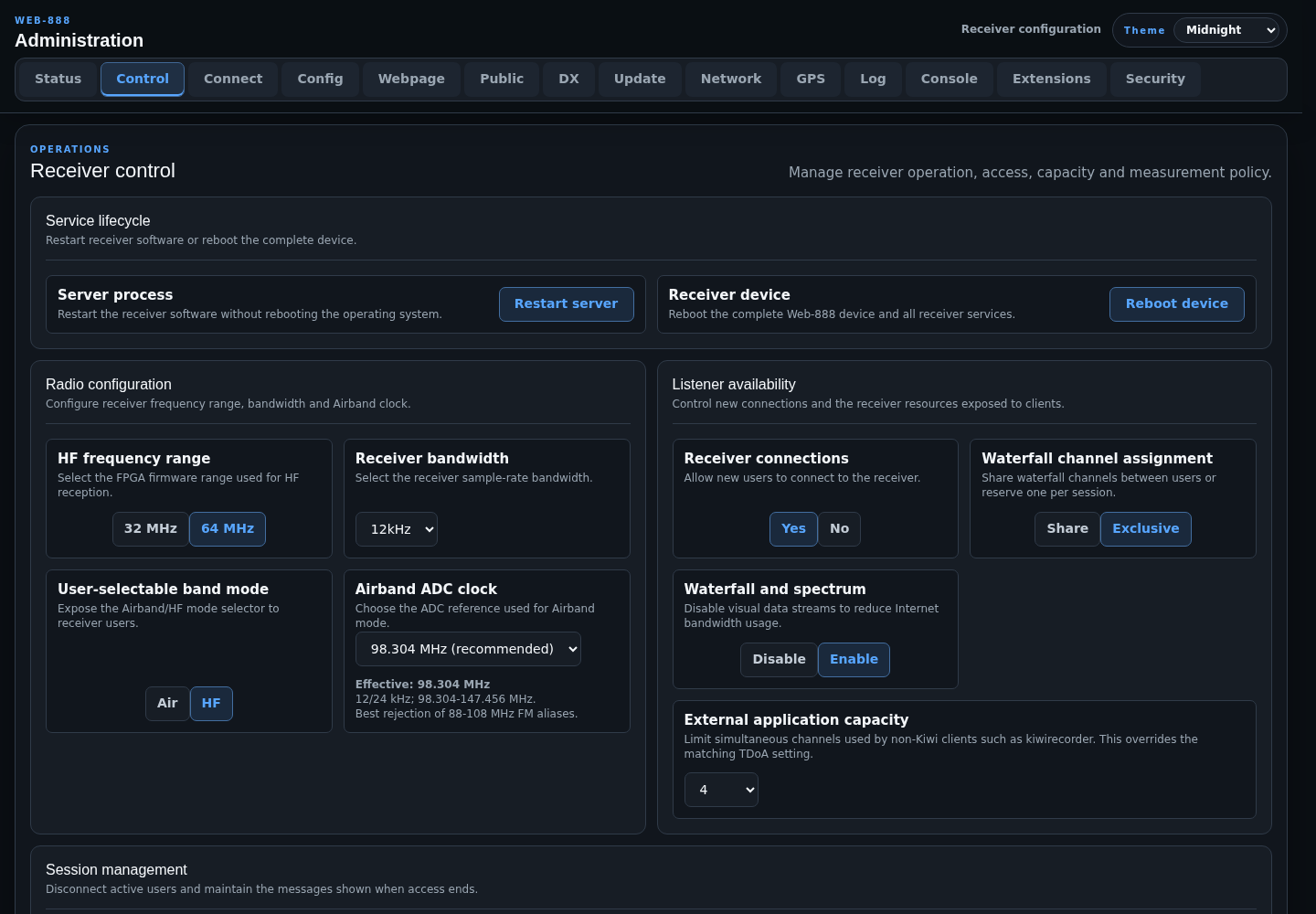
The Control tab manages receiver operation, access, capacity, and SNR measurement policy.
Service Lifecycle
- Restart server restarts the receiver application without rebooting Linux.
- Reboot device restarts Linux and all receiver services.
Both actions require confirmation.
Radio Configuration
- HF frequency range selects the 32 MHz or 64 MHz FPGA range used for HF reception.
- Receiver bandwidth selects 12, 24, or 36 kHz.
- User-selectable band mode exposes the Air/HF selector to receiver users.
- Airband ADC clock appears only when Air mode is enabled.
These settings require a server restart. For ordinary browser listening, 12 kHz receiver bandwidth is recommended. Some extensions may not support 36 kHz correctly.
In Air mode, Web-888 switches to the VHF input and uses oversampling for Airband and 2 m reception.
Airband ADC Clock
- 98.304 MHz (recommended) supports 12 and 24 kHz receiver bandwidths and covers 98.304-147.456 MHz. It provides the best rejection of aliases from the 88-108 MHz FM broadcast band.
- 110.592 MHz supports 12, 24, and 36 kHz receiver bandwidths and covers 110.592-165.888 MHz. Frequencies from 108 to 110.592 MHz are unavailable with this profile.
When 36 kHz receiver bandwidth is selected, Web-888 forces the effective clock to 110.592 MHz and disables the clock selector. Restart only the Web-888 server during iterative configuration; a complete operating-system reboot is not required.
Listener Availability
- Receiver connections allows or rejects new listener connections.
- Waterfall channel assignment selects shared or exclusive waterfall allocation.
- Waterfall and spectrum can disable visual data streams to reduce outbound bandwidth.
- External application capacity limits simultaneous channels used by non-native clients such as kiwirecorder and overrides the matching TDoA setting.
Availability changes marked by the restart indicator take effect after a server restart.
Session Management
Kick all users disconnects every active receiver session. Two message fields control what listeners see:
- the message shown when receiver access is disabled
- the message shown after users are disconnected
Each field has an HTML preview.
Connection Time Limits
- Inactivity limit disconnects inactive clients after the configured number of minutes.
- Per-IP daily limit limits total daily use by a client IP.
- Time-limit exemption password bypasses both limits and can be supplied in a receiver URL as
/?password.
Use 0 for no limit. Local-network connections are exempt.
Receiver Capacity
- Audio campers per receiver channel controls how many listeners may monitor an occupied channel. Reduce it if audio camping causes receiver performance problems.
- Allow non-native connections to preempt autorun processes lets external clients take channels assigned to preemptible autorun jobs.
These settings require a server restart.
SNR Monitoring
Automatic measurement interval can be disabled or set to hourly, 4 hours, 6 hours, or 24 hours. Results are published at:
http://web-888.local:8073/snrEnable Timestamp SNR measurements with local time when local timestamps are preferred. Measure SNR now starts an immediate measurement.